Saturday, January 3, 2026
Building a Text-to-Speech Web App Using Streamlit and gTTS
Mohd Ayan
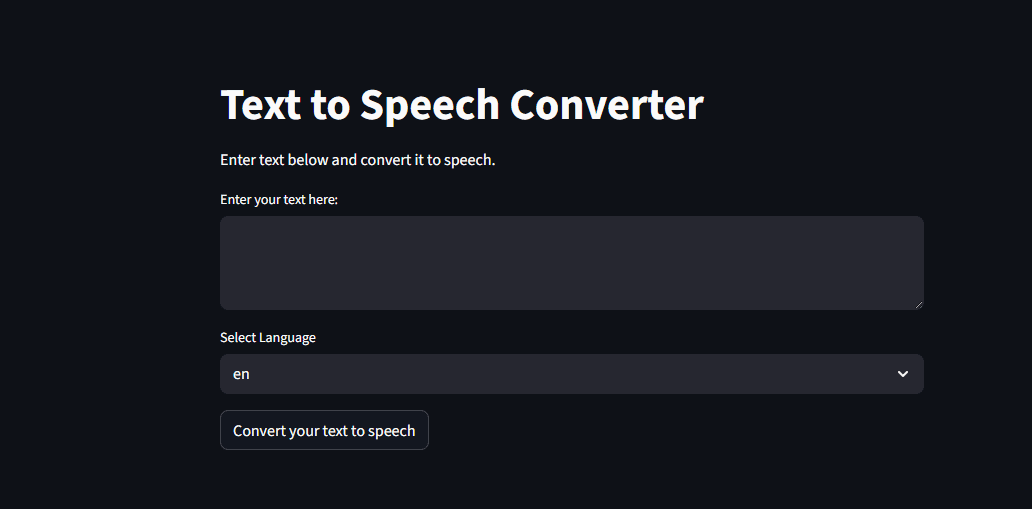
Text-to-Speech technology plays an important role in modern applications—from accessibility tools to voice assistants and content creation platforms. To understand how this technology works in practice, I built a Text-to-Speech Converter web application using Python, Streamlit, and gTTS.
This project converts written text into spoken audio and allows users to listen to or download the generated speech directly from the browser. In this blog, I explain how the app works, why I chose these tools, and what I learned while building it.
Project Overview
The Text-to-Speech Converter is a simple yet practical web application where users can:
- Enter any text
- Choose a language or accent
- Convert text into audio
- Play the audio instantly
- Download the generated speech file
The entire application is built using Streamlit, which makes it easy to create interactive web apps using only Python.
Github:-https://github.com/Ayan0755555/text-to-speech.git
Why I Built This Project
I created this project to achieve three main goals:
Understand speech synthesis basics
Learn how to build interactive Python web apps
Create a useful tool that can be extended later
Instead of working only on console-based scripts, I wanted to build something visual and user-friendly that anyone could use without technical knowledge.
Why Streamlit Is Used
Streamlit is perfect for projects like this because:
- It requires no frontend development
- UI elements like text boxes, buttons, and audio players are built-in
- Changes appear instantly during development
- It’s ideal for AI and data-driven applications
Using Streamlit allowed me to focus on functionality, not complex UI code.
Why gTTS (Google Text-to-Speech) Is Used
The gTTS library is a Python interface for Google’s Text-to-Speech service.
I chose gTTS because:
- It produces clear and natural-sounding speech
- It supports multiple languages
- It is easy to integrate
- It works well for beginner and intermediate projects
This makes it a great choice for learning speech synthesis without heavy setup.
How the Text-to-Speech Function Works
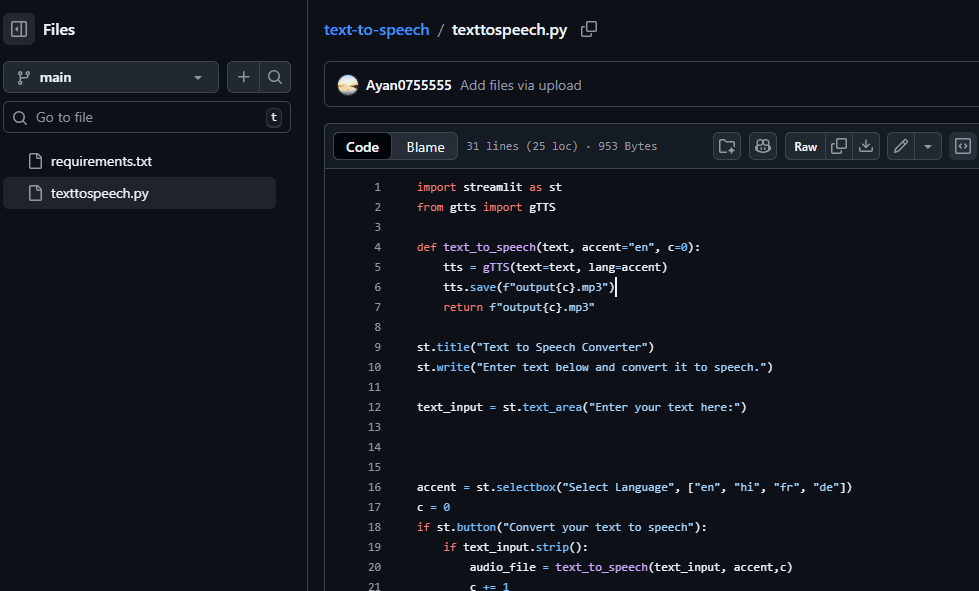
At the core of the project is a function that converts text into speech.
The function:
- Takes the user’s text
- Accepts a selected language/accent
- Uses gTTS to generate speech
- Saves the output as an MP3 file
- Returns the file path for playback
This separation of logic keeps the code clean and reusable.
User Interface Flow
The application interface is simple and intuitive:
1. Title and Description
The app starts with a clear title and a short instruction so users immediately understand what the tool does.
2. Text Input Area
Users can enter any text they want to convert into speech.
This supports both short sentences and longer paragraphs.
3. Language Selection
A dropdown menu allows users to choose the language:
- English (en)
- Hindi (hi)
- French (fr)
- German (de)
This makes the app more inclusive and practical.
Converting Text into Speech
When the user clicks the “Convert your text to speech” button:
- The app checks if text has been entered
- If the input is valid, the text is passed to the conversion function
- The speech file is generated and saved
- The audio is played directly in the browser
This instant feedback improves the user experience.
Audio Playback and Download Feature
After conversion:
- The audio is embedded using Streamlit’s audio player
- Users can listen immediately
- A download button allows saving the MP3 file locally
This makes the project useful for real-world scenarios like:
- Creating voice notes
- Generating audio for presentations
- Producing narration for content
Input Validation and User Feedback
The app includes basic validation:
- If the text area is empty, a warning message is shown
- This prevents unnecessary processing
- It also improves usability
Small details like this make applications feel professional.
Real-World Use Cases
This Text-to-Speech app can be used in many practical ways:
Accessibility
Helping visually impaired users listen to written content.
Content Creation
Turning blogs or scripts into audio formats.
Language Learning
Listening to pronunciation in different languages.
Voice-Based Apps
Serving as a foundation for chatbots or assistants with voice output.
What I Learned From This Project
This project helped me learn:
- How speech synthesis works
- How to build interactive apps using Streamlit
- How to integrate third-party Python libraries
- How to handle user input and output cleanly
- How to design simple but useful tools
It also reinforced the importance of writing readable, modular code.
How This Project Can Be Improved
In the future, this project can be extended by adding:
- More language options
- Voice speed and pitch controls
- File naming customization
- A history of generated audio files
- Deployment as a public web app
These enhancements can turn this small project into a full-featured application.
Final Thoughts
The Text-to-Speech Converter is a simple yet meaningful project that demonstrates how Python and AI-based tools can solve real problems. By combining Streamlit and gTTS, I was able to build a complete web application without complex frontend code.
This project is a strong example of how small ideas can turn into practical tools when implemented thoughtfully.
You may also like
How to Find B2B Leads Using AI in 2026: Best AI Lead Finder Tools
Arjak
Saturday, October 10, 2026

How Over-Optimization Is Killing Natural Learning in the Modern Age
AN
Monday, February 16, 2026

Why Deep Thinking Feels Uncomfortable in Today’s Digital World
Tim
Sunday, February 15, 2026