Saturday, January 3, 2026
How My Visual Medical Assistant Works Using Streamlit and Gemini AI
Mohd Ayan
Explore how a Visual Medical Assistant uses Google Gemini AI and Streamlit to analyze medical images ethically without diagnosis, focusing on safety and education.
In this project, I built a Visual Medical Assistant that analyzes uploaded medical images using Google Gemini AI. The goal was not to replace doctors, but to explore how modern AI models can assist in medical image interpretation, reporting, and recommendations in a responsible way.
This blog explains how the application works, why each technology was chosen, and what makes this project different from simple AI demos.
Project Overview
The Visual Medical Assistant is a web-based AI application built using Streamlit. It allows users to upload a medical image (such as X-rays, skin images, or scans) and receive a structured AI-generated analysis.
Instead of giving a diagnosis, the assistant focuses on:
- Observations
- Possible visual patterns
- General recommendations
- Safety disclaimers
This design choice makes the project ethical, educational, and responsible.
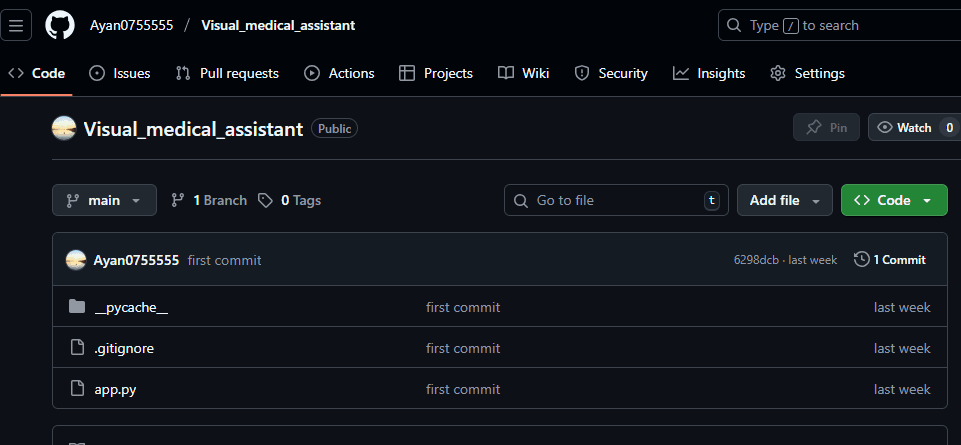
Github:https://github.com/Ayan0755555/Visual_medical_assistant.git
Why I Used Streamlit
I chose Streamlit because it is one of the fastest ways to turn Python code into an interactive web application.
Streamlit helps because:
- No frontend framework is required
- UI components are simple and clean
- Perfect for AI and data-driven apps
- Ideal for prototypes and demos
With just Python, I was able to create:
- File upload functionality
- Buttons and layouts
- Image previews
- Live AI output rendering
This keeps the focus on AI logic, not UI complexity.
Setting Up the Application Layout
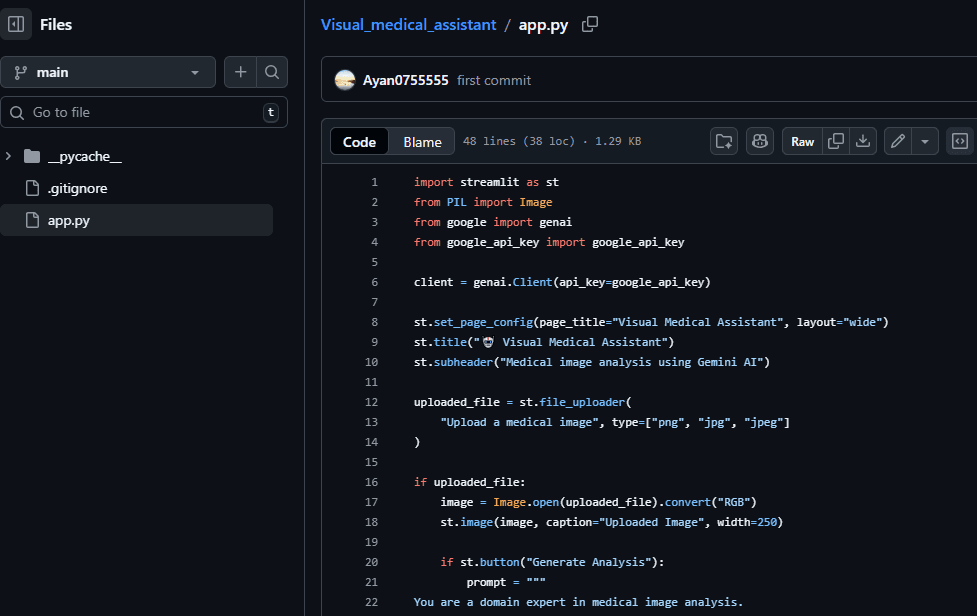
At the start of the application, the page configuration is defined:
- A clear title
- Wide layout for better readability
- A professional medical assistant theme
The interface includes:
- A title with an AI/medical identity
- A short description explaining the purpose
- A clean upload area for medical images
This makes the app intuitive even for non-technical users.
Medical Image Upload Handling
The application allows users to upload images in common formats:
- PNG
- JPG
- JPEG
Once an image is uploaded:
- It is opened using the PIL (Python Imaging Library)
- Converted into RGB format for consistency
- Displayed back to the user as confirmation
This step is important because:
- Medical images come in different formats
- AI models require consistent image input
- Users can visually verify what they uploaded
Why PIL (Python Imaging Library) Is Used
PIL is used to handle image processing safely and efficiently.
It helps by:
- Opening uploaded images
- Converting formats
- Ensuring compatibility with AI models
Without this step, AI input errors could occur.
Integrating Google Gemini AI
The core intelligence of this project comes from Google Gemini AI.
I used the Gemini 1.5 Flash model because:
- It supports multimodal input (image + text)
- It is fast and cost-efficient
- It provides high-quality descriptive output
The API key is stored separately for security reasons, which is a best practice in real-world applications.
Designing a Safe Medical AI Prompt
One of the most important parts of this project is the prompt design.
Instead of asking Gemini to diagnose, the prompt:
- Positions the AI as a medical image analysis expert
- Requests structured output under fixed headings
- Explicitly forbids diagnosis
- Requires a medical disclaimer every time
The response must include:
Detailed Analysis
Analysis Report
Recommendations
Treatments
And it must always remind users to:
“Consult with a doctor before making any medical decisions.”
This ensures:
- Ethical AI usage
- Reduced risk of misinformation
- Compliance with medical safety norms
Generating the AI Analysis
When the user clicks “Generate Analysis”:
- The image and prompt are sent together to Gemini
- The AI processes both visual and textual context
- A structured medical-style response is generated
The result is displayed directly on the page in a readable format, making the experience smooth and interactive.
Error Handling and Reliability
The application includes error handling to manage:
- API failures
- Network issues
- Unexpected AI errors
If something goes wrong:
- A clear error message is shown
- Technical details are displayed safely for debugging
This is important because AI APIs can fail, and professional applications must handle failures gracefully.
Why This Project Is Different
Unlike many AI medical demos online, this project:
- Does not claim to diagnose
- Focuses on analysis, not conclusions
- Uses structured medical reporting
- Emphasizes human doctor consultation
- Is transparent about limitations
This makes it suitable for:
- Learning purposes
- AI research demos
- Educational tools
- Responsible AI showcases
Real-World Use Cases
This Visual Medical Assistant can be used as:
- A learning tool for AI + healthcare students
- A prototype for medical AI research
- A demonstration project for portfolios
- A foundation for future AI health applications
With further development, it could include:
- Medical image datasets
- Confidence scoring
- Visual highlighting
- Web or mobile deployment
What I Learned From This Project
Through this project, I gained hands-on experience with:
- Multimodal AI (image + text)
- Streamlit app development
- Secure API integration
- Prompt engineering for sensitive domains
- Responsible AI design
More importantly, I learned how AI should assist humans, not replace professional judgment.
Final Thoughts
The Visual Medical Assistant is a meaningful step toward understanding how AI can support healthcare responsibly. It demonstrates how modern AI models like Gemini can analyze visual data while still respecting ethical boundaries.
This project reflects my interest in:
- AI applications
- Healthcare technology
- Safe and responsible system design
It is not just a technical project—it represents thoughtful AI development.
You may also like
How to Find B2B Leads Using AI in 2026: Best AI Lead Finder Tools
Arjak
Saturday, October 10, 2026

How Over-Optimization Is Killing Natural Learning in the Modern Age
AN
Monday, February 16, 2026

Why Deep Thinking Feels Uncomfortable in Today’s Digital World
Tim
Sunday, February 15, 2026